Show the work as three practical levels
Insert approved snippets
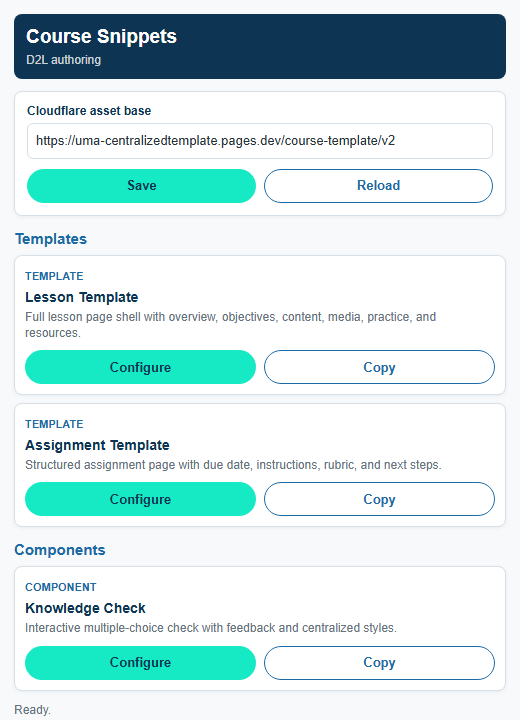
The Chrome/Edge extension reads the hosted snippet manifest and lets an author configure, copy, or insert templates and components directly into D2L.
- No AI required.
- Reduces searching for templates.
- Uses approved centralized HTML.
Generate from a form
The page generator turns structured fields such as title, description, objectives, and resources into copy-ready course page HTML.
- No AI required.
- Reduces manual formatting.
- Fits repeatable page patterns.
Structured form generator
Generate a course page from structured fields
Use this to show the middle layer: an author can paste or edit structured text, generate centralized HTML, then copy it into D2L.
Page Details
Generated Course Page
Generated course content will appear here.
Copy-Ready Markup
Draft from source content with AI
The next layer can use a blueprint, ebook, style guide, and component rules to draft an aligned lesson that still routes through review.
- Uses blueprint objectives as constraints.
- Uses ebook content as grounded source material.
- Outputs centralized template HTML for SME review.
GM1000 Week 1 gives us a credible demonstration
Blueprint / Spec Sheet
Course: GM1000 Introduction to Business & Office Operations
Week 1: Business Basics
Module: Business Interactions
Objective: Analyze how people, technology, and procedures interact to influence productivity and risk.
Activities: Learn: Key Points, Chapter 1. Practice: Self-Assessment.
Generated Ebook Content
Chapter 1: The Office as an Operations System
Relevant sections: Business Interactions; People, Technology, and Procedures; Organizational Structures and Goals.
Available assets: opener image, visual checks, study aids, interactive study activity, markdown/html/docx exports, and agent QA reports.
Quality signal: The ebook agent report shows curriculum alignment, source fidelity, image accessibility, writing style, and export checks passing.
Week 1 lesson draft from blueprint + ebook source
Business Interactions: People, Technology, and Procedures
- Source: Spec Sheet + Ebook Chapter 1
- Activity: Key Points + Self-Assessment
- Review: SME / ID Required
Lesson Overview
In this lesson, you will examine how office operations depend on people, technology, and procedures working together. You will use a workplace scenario to identify where productivity improves and where risk increases when one part of the system is unclear.
Learning Objectives
People
Describe how people influence productivity and risk.
Technology
Describe how technology influences productivity and risk.
Procedures
Describe how procedures interact with people and technology to influence productivity and risk.
How the three-part system works
People influence work through judgment, communication, attention, skill, workload, and ownership. Technology can store records, route requests, and support reminders, but it only reduces risk when the information is complete and the workflow is clear. Procedures give the team a shared standard for what to do next.
The important point is that none of these elements works alone. A trained employee still needs accurate records. A strong software system still needs users who understand the workflow. A written procedure still needs tools that support it.
| Element | What it contributes | Risk if unclear |
|---|---|---|
| People | Judgment, communication, ownership, and follow-through. | Work depends on memory or assumptions. |
| Technology | Records, routing, reminders, status, and shared information. | The tool stores information but does not make ownership clear. |
| Procedures | Steps, standards, decision rules, and escalation paths. | Staff handle the same situation in inconsistent ways. |
Check Your Understanding
Knowledge Check
A scheduling system sends reminders, but staff still miss urgent appointment requests because no one owns the follow-up queue. What is the best interpretation?
- The technology should be removed.
- The technology needs clear people ownership and procedures.
- The issue is only a training problem.
Correct. The system works when people, technology, and procedures support one another.
Not quite. The lesson emphasizes that tools, people, and procedures must work together.
How to explain the demo
What we have now
Centralized snippets, an extension proof of concept, a form generator, and a component library that outputs consistent D2L-ready HTML.
What AI adds
AI can draft the first version of a lesson by matching blueprint objectives to source content, then applying approved components and page structure.
What still needs governance
Source validation, SME review, accessibility QA, copyright review, style review, and final D2L testing remain required.